:: micsaund.com ::

Mike’s World of fun stuff (pinball, games, electronics, amusement parks, computers, more)

May 7, 2007

Open source PCB design and layout

by @ 6:04 pm. Filed under Electronics, Software

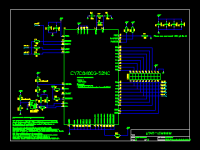
gEDA screenshot
Using the gEDA tool suite, you can design your own schematics and circuit boards on any platform that support X Windows, including Mac OS X.


Yeah, yeah... I can hear all of the people who wrote to me asking for a schematic of my hard drive bargraph project saying, "hey, why don't you use this gEDA stuff and give me a schematic?!" Well, I will, for future circuits, and perhaps I may create a schematic for the bargraph, who knows.

Anyway, making your own boards is one of those potentially complicated things that uses software which can easily cost in the tens of thousands of dollars (think OrCAD). The gEDA (gnu Electronic Design Automation) suite is a set of open-source free tools that let you do similar things to the expensive commercial packages, if you're willing to learn a little.

The gEDA stuff is not new and I've fiddled with it on Linux, but I also found these instructions on how to install it using fink on OS X. With the increasing popularity of the Mac and its Unix based underpinnings, more and more people are "making the switch" and might want to know how to install gEDA on OS X.

Give it a try. I'm going to install it on my MacBook at some point and see how it works.

stumbleupon:Open source PCB design and layout del.icio.us:Open source PCB design and layout digg:Open source PCB design and layout spurl:Open source PCB design and layout wists:Open source PCB design and layout simpy:Open source PCB design and layout newsvine:Open source PCB design and layout blinklist:Open source PCB design and layout furl:Open source PCB design and layout reddit:Open source PCB design and layout fark:Open source PCB design and layout blogmarks:Open source PCB design and layout Y!:Open source PCB design and layout smarking:Open source PCB design and layout magnolia:Open source PCB design and layout segnalo:Open source PCB design and layout gifttagging:Open source PCB design and layout

Related Stuff:

Free software lets you build your own pinball machine simulations
Ever wanted to bring that imaginary pinball machine in your head to life? Well, maybe not for real, but virtually? I think that everyone who plays pinball has, at one time or another, dreamt of designing their own machine. It's only natural to see the mechanical actions and believe that you could build sometime as good or better. Well, dream no more. With Future Pinball, a free software package for Windows, you can create your own 3D virtual machines. You first design the playfield layout using standard components and then you script the game's logic using a Visual...

PIC microcontroller based video game system
Using a trio of PIC microcontrollers, this guy built a fully functional video game which uses analog paddles and has more gameplay than the usual Pong type stuff you typically see from PIC games. People have been making very simple pong type games using Microchip PIC microcontrollers for some time. However, due to the very limited power of the PIC, you typically don't see anything involving sound, moving backgrounds, more advanced gameplay, or animation. John Sachs Beeckler decided to take PIC-based gaming to the next level, though. His design uses three PICs to sub-divide the tasks required for making a...

FAQ
Q: Do I have to register to post comments in the blog (main page content)? A: No. You can post comments anytime without registering, logging-in, etc. Just fill the boxes out and you're all set. Q: Why is my e-mail requested when posting a blog comment? A: It's requested because that's the default behavior of the blog software and I didn't feel it was a big enough issue to worry about. I don't even look at the e-mails and certainly never sell, loan, or give them away (I probably hate spam more than you!) If you're especially paranoid, I...

Build your own FPGA based Amiga 500 clone
The Amiga 500 was one of the very popular "non-IBM" choices back in the day thanks to its great selection of games powered by then-cutting-edge graphics chips and incredible stereo sound processors. If you long for the days of the Amiga and have a desire to build a project, this open-source hardware design might just what you need! We've come a long way since 1987, which was the year the incredible Commodore Amiga was introduced. The Amiga was literally ahead of its time with 4096 color graphics, stereo sound, built-in speech synthesis and of course, a graphical user interface....

Cool FPGA board lets a Gameboy Advance control robots and more!
With the upcoming release of the Nintendo DS Lite, my GBA SP will be heading to the "infrequently used" pile. This might give it new life. Here's an interesting gizmo that could be used for all kinds of things. It's called the Xport 2.0 and it's basically an FPGA development board that's built to interface with the Nintendo Gameboy Advance series of handheld gaming systems. The board has a Xilinx FPGA along with some flash memory, SDRAM, and various support components like pin headers for the digital I/O. Features, according to the manufacturer: Fully programmable FPGA with 50,000 or 150,000...

Explore more

Previous post: Devel board combines logic analyzer, micros, etc.

Next post: Fun Google Maps trick

Leave a Reply

[powered by WordPress.]

micsaund.com

arcade games:

categories:

search blog:

syndication:

other links:

34 queries. 0.393 seconds