If you’ve got a QNAP NAS and some file in your music library is causing the QNAP’s iTunes server to die, here’s how you can track-down the problem and fix it.
A while back, I finally decided to drop the money on a Qnap TS-219P pre-built NAS (network attached storage). It’s small, silent, draws almost no power, has a nice web based UI, and features many services such as Windows (SMB) sharing, Apple (AFP) sharing, web server, iTunes server, DLNA via Twonky, and much more. Sure, I could have built my own PC to do all this, but that takes time up-front, and time to maintain it, so I spent a little more to get an “already done for me” solution.
After months and months of owning the Qnap and having it silently and reliably serving up network storage for manual file copies, OS X’s Time Machine, etc. I thought things were perfect. But, one day, I ran an automated tool on my iTunes library which corrects bad ID3 data, adds album art, etc.
So, once I had reworked my entire music library with this tool, I copied all of the files to the Qnap so that its built-in iTunes server could offer them up to any machine in my house.
That’s when I had a problem. When I copied the music library to the Qnap, an iTunes running on another machine would lose the connection to the shared library. It seems that at least one of the thousands of files in the library was causing the iTunes service on the Qnap to choke and die. I could delete the library and restart the service via the GUI, and it would stay running. But, as soon as I put my library back on the Qnap, the service would again die.
I inquired on the Qnap forums and the official Qnap representative offered to have someone look at my NAS to find-out why the iTunes server was dying. I asked if they had any logs or some other way that I could do it myself, since, well, I prefer doing that myself and then I would not have to either be around when their support person was available, or give them unsupervised admin access. The answer was “no” – I would need to have them look at the problem. Now, don’t get me wrong, I DO appreciate Qnap’s willingness to investigate the problem, but I would just prefer to know how to do it myself, in case it ever happens again in the future.
Anyway, I figured-out how to troubleshoot the crashing Qnap iTunes server myself, and figured I’d share it in case anyone else out there prefers to self-resolve problems like this.
NOTE: This is not a hand-holding HOWTO, so if you’re unfamiliar with commandline stuff, please let the Qnap support people do this for you. I offer no guarantees whatsoever.
First, you need to open an SSH session to your QNAP NAS as the admin user.
Once you have done that, the name of the iTunes server is ‘ mt-daapd ‘.
In my case, doing a ‘ ps | grep mt-daapd ‘ returned no running processes, so I knew that the service was truly not running. You should run this command also to check that the service is truly dead.
If you run ‘ mt-daapd --help ‘ you’ll see the usage statement, like this:
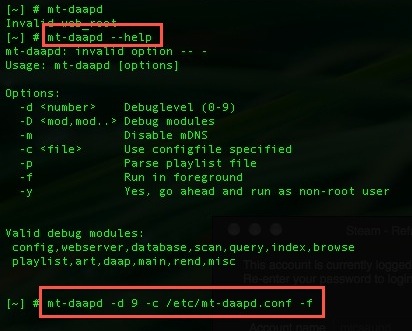
So, the next step is to run the mt-daapd in the foreground so we can watch it spew log information to the screen. Use ‘ mt-daapd -d 9 -c /etc/mt-daapd.conf -f ‘ This will cause lots of log spew to scroll-by. If the problem you’re having is the same as mine, the output will stop with a segfault like this:
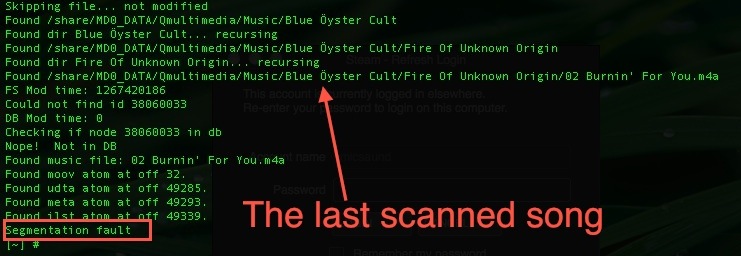
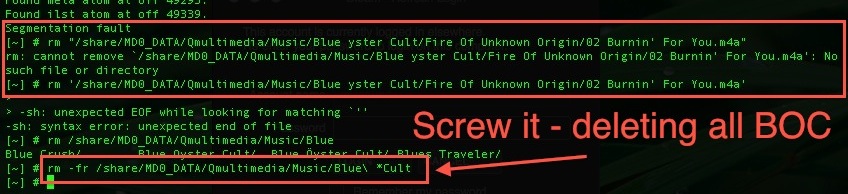
In this particular case, I think the “o” with the dots above it are the problem. Nothing I did would allow me to cut/paste that character on the Qnap, so I’m guessing that when that character gets encountered, that’s what is causing the segfault. I chose to simply delete the directory/files by that band as they’re not one of my favorites anyway:
Running ‘ mt-daapd -d 9 -c /etc/mt-daapd.conf -f ‘ again, I saw that the entire library was parsed and the service was ready to accept connections:
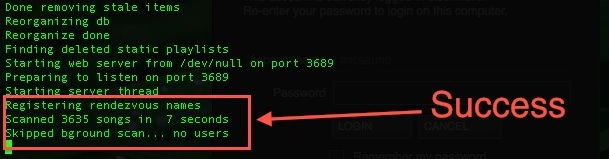
Control-C that to stop the foreground debug copy, and then use the Qnap web-UI to restart the service by unchecking it, hitting OK, and then re-check and OK it. Now, when you do the the ‘ ps | grep mt-daapd ‘ you should see something like this:
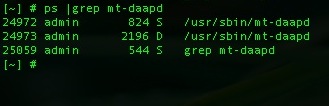
And, your shared iTunes library should be showing-up normally.
I love my Qnap TS-219P, but I wish they’d offer more information on self-resolving stuff like this so I don’t have to figure it all out. But, hopefully, that’s the last problem I run into and if so, I’m still quite happy with the purchase.
Your posting and research has proved invaluable. Just bought the same unit and uploaded a massive library from my wife’s computer only to have the service bomb in the middle. I hopped on the device and was able to find the offending track. Once I deleted it from the system. All is right with the world. Thanks for the tips. . . .
To be honest, if metadata can cause the server to crash like that, it is faulty.
Perhaps the tool you used has messed up the utf-8 encoding in the tags or whatever, but it shouldnt die.
I would be sending those files to the qnap support guys and telling them to make it work.
Brad – I’m glad it helped. I’ve been living with the broken QNAP iTunes server for months, hoping they’d fix it in every firmware release. At least I could save you some of the same frustration 😉
Richard – I agree completely. It’s partially my fault for not wanting to turn-over unsupervised admin access to the NAS, but I might go ahead and send them the file in question so they can analyze it. I suspect that the fact that I could not paste the “o” with the dots *at all* indicates that the QNAP OS doesn’t have support for whatever language uses that symbol, so it chokes when it hits it.
Thanks for sharing this. Fantastic tip. I found one track out of 8000+ that was causing the itunes server problems. Not the same problem as you – and I’m sure I have German characters in some of my music. Turned out it was a very short bonus track on a Hot Chip album called The Warning. It only lasts a couple of seconds and doesn’t play anything. So I deleted it and iTunes came back. Thanks again.
QNAP or itunes really need to address this. I got no error message when the itunes server suddenly disappeared after it started to scan the songs newly loaded to the QNAP.
Hey thanks buddy, your tutorial was really helpful. I have contacted qnap quite a few times and they have tried to help with the issue. they fixed it however the one way to do so was to removed all my media files to another location and the services started. I have 74000+ mp3 and they expected me to go through them one by one. after following your step multiple times since i had alot of mp3 to delete. 4 hours later its working. YES YES YES. By the way, it is best to let the whole process complete and not press CTRL+C because the library playlists database needs to be created and the iTunes service and port will be tested as well.
This was very helpful, I had to remove one file, which made the process have a succesfull scan.
Thanks. Very helpful. Only two files i remove. And it works.
Thank you! My mt-daapd process wasn’t bombing out in the same way as yours – it simply refused to find any music files. Your howto pointed me at the configuration file which I was able to tweak to point to exactly where my music files are. Bingo and it now works.
I don’t know why Qnap don’t expose the full iTunes server configuration in the web interface, or at least allow us to start/stop the server and get at some logs, but there you go…
I am about to purchase a TS-219P+… what hard drive are you using? I am considering SeaGate 1.5T 7200rpm… press on the 2TB models do not look good, but… I would like feedback
Thanks for the feedback everyone.
Alan, I was using Samsung Spinpoint F1 750GB drives and recently (about 2 months ago) swapped in a pair of Spinpoint F4 2TB drives. I’ve been exceptionally happy with the Spinpoint drives and would recommend them. Microcenter had the 2TB on sale for $99 each when I bought them, and they can be had for a few bucks less since then.
would just like to say that its the ` in the file name thats the problem not the o to set up a itunes server on any qnap just copy your itunes folder to qmedia folder and tick the server in qnap control panel easy..
just in the case that anybody beside me runs into this: My iTunes sees my Lib on the qnap but when I click it, itunes deselects the qnap lib after a second or so and jumps back to my local library.
The fix described, deleting/renaming some of my music wasn’t my favorit option… You know… deleting stuff…
As it turnes out (thx for the verbose forground cmd) my mt-daapd is unable to process not my files but some of my m3u files and resets the connection. Mt-daapd doesn’t seem to crash but it’s enought for iTunes to drop the connection.
I was able to fix this by changing a line the qnaps /etc/mt-daapd.conf
turing: process_m3u 1 => process_m3u 0
Restarted the service and everything worked like a charm.
Cheers Corelgott
Ps.: for anybody wanting to get serious into the debugging the protocol… http://tapjam.net/daap/ helped me alot
Good walkthrough! I also found Itunes disconnecting on some m3u’s. Just deleted them.
But now when I make a smart playlist in the Qnap admin interface I get the same problem (although no m3u’s are created). Running Itunes 10.3.1.55
Stupid Apple..
Thanks a million! Top tip. I was pulling my hair out with moving files backwards and forwards to find the culprit. Found it straight away with this. No idea what’s wrong with the file. Will try re-endcoding and putting it back in.
Thanks again!
Well done! The only place I found a answer/fix to the most annoying problem with my new NAS!
Thanks.
you beauty. fixed an ongoing itunes server issue with my QNAP TS-419P Turbo. great work
Thanks this highlighted which file was causing the service to die. I deleted the file also.
Big thanks
Hi,
I’ve troubles with al lot of files, which seems normal as eg:
Adding /share/MD0_DATA/Multimedia/Music/MP3/Anita Baker/Onbekend album/Sweet Love.mp3
Segmentation fault
Does anyone have an idea?
Philippe
Nice post. Makes for and easy fix
2 years on and this worked for me and my TS-209 Pro. Thanks.
It would be nice to know why my file(s) failed though. They do not appear to contain any non-print characters in the filename, and play fine in iTunes.
Great post. I found I’d accidentally copied and iTunes folder into my music collection. I think this was sending the db scan into a loop.
Deleting the folder, moving the sqlite database and restarting fixed the problem.
Looking at /etc/mt-daapd.conf was useful too – I added “/Music” to mp3_dir:
mp3_dir = /share/Multimedia/Music
Hi,
Mine fails with “disk I/O error”, please take a look:
[~] # mt-daapd -d 9 -c /etc/mt-daapd.conf -f
Global config file /mnt/HDA_ROOT/.config/mt-daapd.conf
Loading config file /mnt/HDA_ROOT/.config/mt-daapd.conf
Opening file:///mnt/HDA_ROOT/.config/mt-daapd.conf?ascii=1
Checking handler for file
opening /mnt/HDA_ROOT/.config/mt-daapd.conf
Config file open
Got general/web_root, convert to general/web_root (/dev/null)
Found existing section
Got general/port, convert to general/port (3689)
Found existing section
Got general/admin_pw, convert to general/admin_pw (Lopov10!)
Found existing section
Got general/db_type, convert to general/db_type (sqlite3)
Found existing section
Got general/db_parms, convert to general/db_parms (/mnt/HDA_ROOT/.db_dir)
Found existing section
Got general/mp3_dir, convert to general/mp3_dir (/share/Multimedia)
Found existing section
Found 1 tokens in /share/Multimedia
Token 1: /share/Multimedia
Got general/servername, convert to general/servername (Mali(iTunes))
Found existing section
Got general/runas, convert to general/runas (admin)
Found existing section
Got general/extensions, convert to general/extensions (.mp3,.m4a,.m4p,.aif,.wav,.mp4,.m4b,.m4v,.mpg,.mpeg,.mp1,.mp2,.m1a,.m2a,.mov)
Found existing section
Got general/scan_type, convert to general/scan_type (0)
Found existing section
Got general/always_scan, convert to general/always_scan (0)
Found existing section
Got general/rescan_interval, convert to general/rescan_interval (180)
Found existing section
Got plugins/plugin_dir, convert to plugins/plugin_dir (/usr/local/mt-daapd/plugins)
Found existing section
Got scanning/process_playlists, convert to scanning/process_playlists (1)
Found existing section
Got scanning/process_itunes, convert to scanning/process_itunes (1)
Found existing section
Got scanning/process_m3u, convert to scanning/process_m3u (1)
Found existing section
Checking existence of /dev/null
Creating /dev/null
Checking existence of /dev
Checking existence of /dev/null
Making /dev/null
Chowning /dev/null to admin
Success!
Checking existence of /dev/null
Checking existence of /mnt/HDA_ROOT/.db_dir
Checking existence of /mnt/HDA_ROOT/.db_dir
Checking existence of /usr/local/mt-daapd/plugins
Checking existence of /usr/local/mt-daapd/plugins
Loading new config file.
Firefly Version svn-1696: Starting with debuglevel 9
Attempting to load plugin /mnt/ext/opt/mt-daapd/plugins/out-daap.so
Loaded plugin /mnt/ext/opt/mt-daapd/plugins/out-daap.so (daap/svn-1696)
New transcode codec list:
Attempting to load plugin /mnt/ext/opt/mt-daapd/plugins/rsp.so
Loaded plugin /mnt/ext/opt/mt-daapd/plugins/rsp.so (rsp/svn-1696)
New transcode codec list:
Plugin loaded: rsp/svn-1696
Plugin loaded: daap/svn-1696
Starting rendezvous daemon
Starting signal handler
Opening database
Executing: select value from config where term=’version’
Creating new db handle
Results: 0
Initializing database
Executing: select count(*) FROM songs
Local Hostname Mali.local already in use; will try Mali-2.local instead
Executing: select value from config where term=’rescan’
Executing: vacuum
Query: vacuum
Error: disk I/O error
Aborting
Processing rendezvous message
Rendezvous socket closed (daap server crashed?) Aborting.
Aborting