
On February 16, I sat down at my Windows 7 based Media Center HTPC to watch some Netflix streaming shows, and was instead greeted with an Internet Explorer window stating “Navigation was cancelled”. Here’s how I fixed it.
This sudden failure of the Netflix plugin to stream any shows was pretty annoying. The night before, everything was working fine, and then the next day, it was broken. I had not installed any updates nor changed anything (I was sleeping and at work).
In attempting to fix the “Navigation cancelled” message, I noted that Windows Update had a Silverlight patch. Hmm… I’ll try installing that — maybe it will help….
Nope…
So, I did some digging. I tried logging out of Netflix, deleting the computer from the list of authorized devices on the Netflix site, etc. Reports were emerging all over the web of people having similar problems, so at least I knew it wasn’t something I messed-up on my end!
You’re asking: OK, OK, yeah, my MCE is broken also — just tell me how to fix it!
Here’s the process I did which allowed my MCE to stream Netflix after the February 16, 2011 problem. This is based upon a Windows 7 64 bit install, but should work fine with Windows 7 32 bit also.
Click images for larger versions.
1 ) Close Windows 7 Media Center.
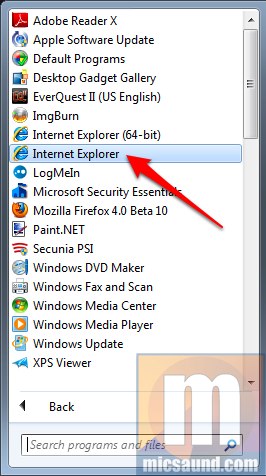
2 ) Open the 32 bit version of Internet Explorer 8. Note that on 64 bit Windows, there are TWO links for IE. You need the one that does NOT say 64 bit.
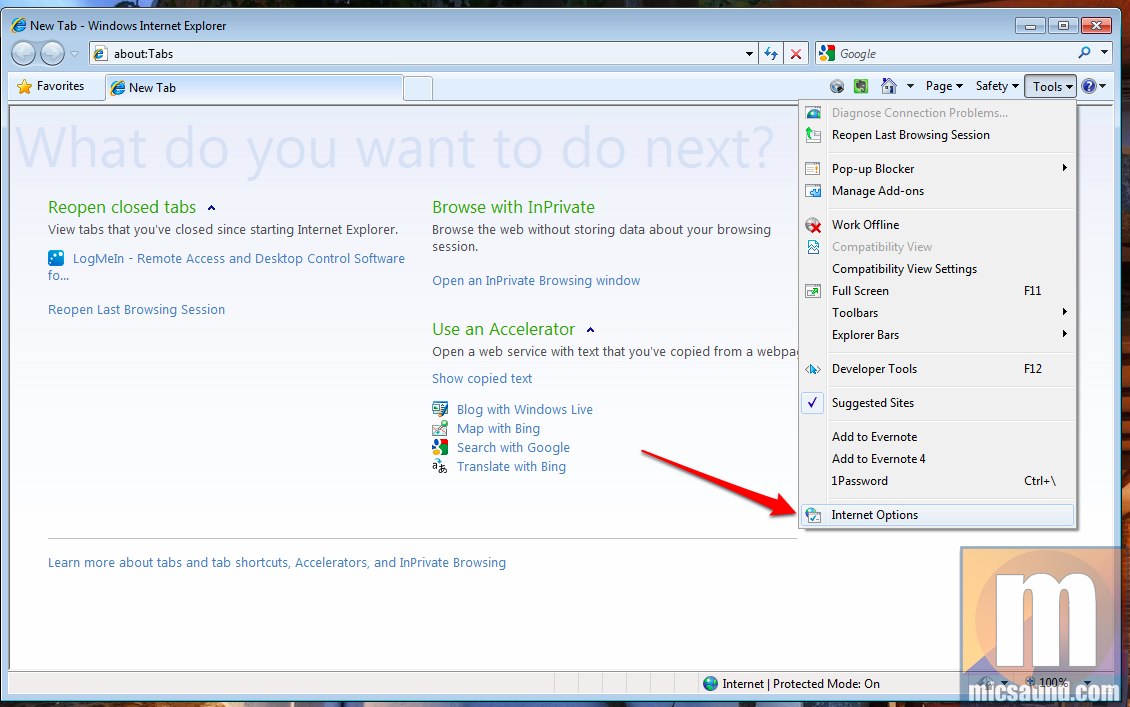
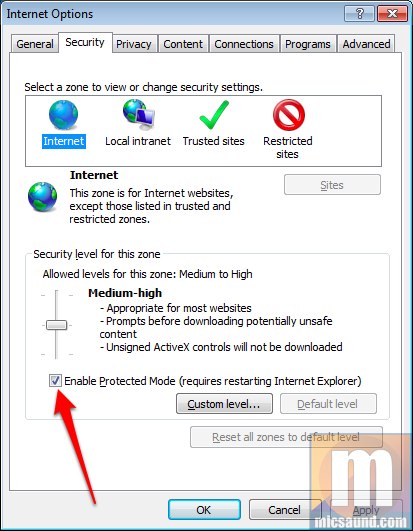
3 ) In the upper right of IE8, click the Tools button, and then Internet Options at the bottom.
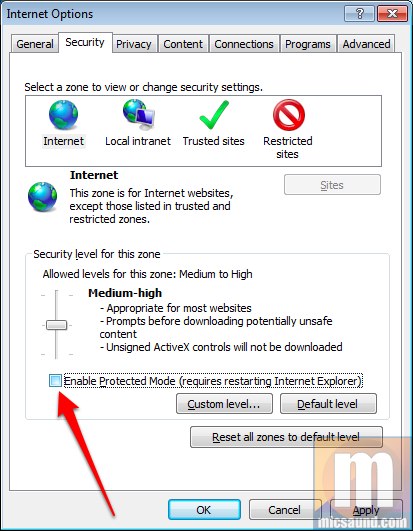
4 ) UN-check “Enable Protected Mode” and click OK.
5 ) Close IE8. This is important!!!
6 ) Open IE8 again. Not the 64 bit version.
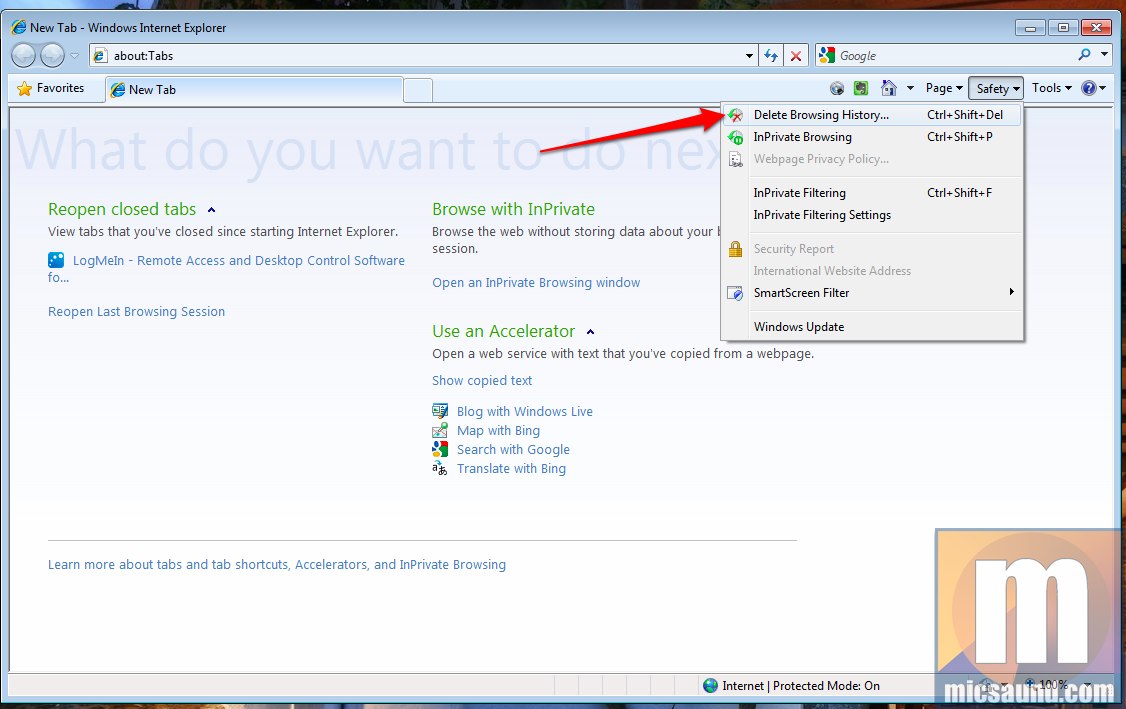
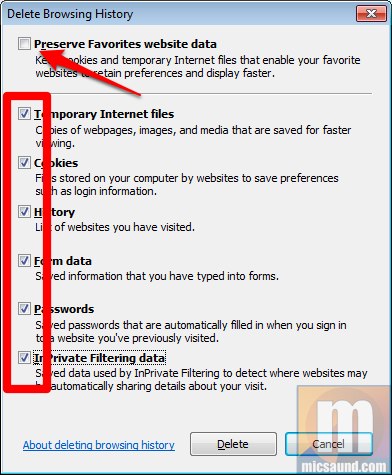
7 ) In the upper right of IE8, click the Safety button, and then Delete Browsing History at the top.
8 ) UN-check “Preserve favorites website data” at the top. Check the rest of the boxes to clear cache, cookies, etc. and hit Delete.
9 ) Go back into the Tools menu in the upper right and select Internet Options at the bottom.
10 ) Re-check the “Enable Protected Mode” and click OK.
11 ) Close IE8.
12 ) Re-open IE8.
13 ) Go to www.netflix.com and login as you normally would.
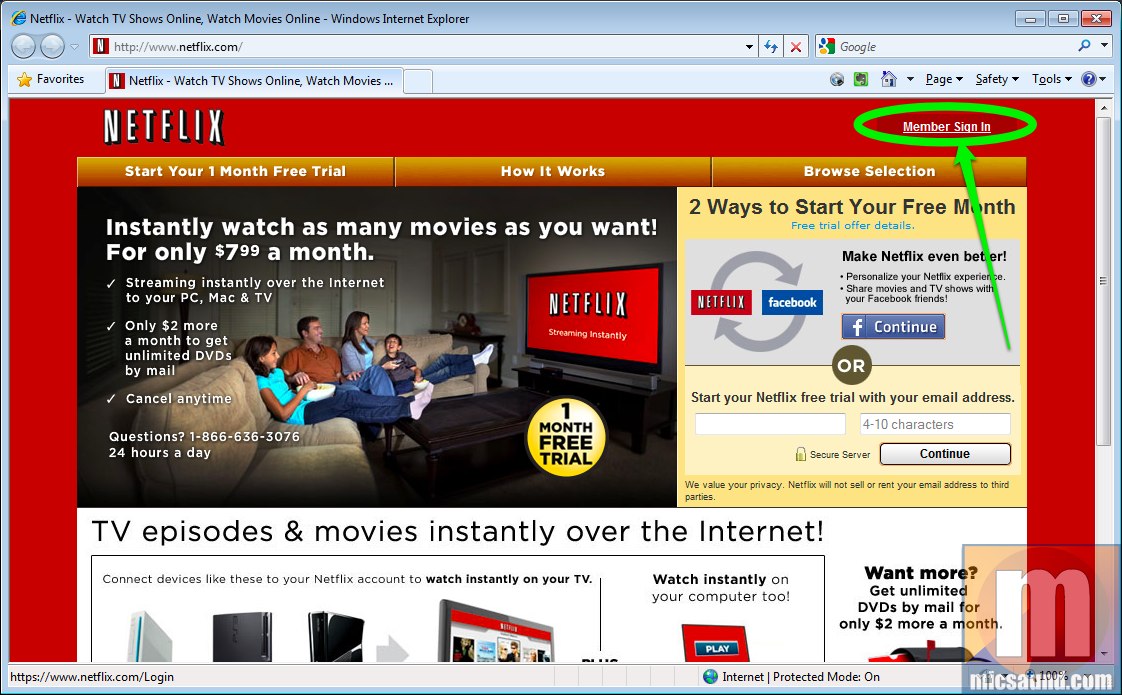
14 ) Leave IE8 open with the Netflix page logged-in.
15 ) Open Media Center and go to the Netflix plugin. Try to play a movie. MCE may ask you if it’s OK to send your login info again. Select Yes.
This procedure fixed my Windows 7 Media Center Netflix streaming. Hopefully it can help someone else out there too, as this issue is very frustrating and Netflix is doing very little to fix it at the time of this writing.
Thanks for the post
Fixed my Netflix streaming from Media center.
I am glad people like you post there useful
fixes.
Good advise.
Hi Tim — thanks for the kind words and I’m glad this tip helped you out!
Mike
You’re my hero.
Worked for me! Thanks for making this article.
Yea man, that did it- woo hoo!! That was super-annoying, thanks!
Thank you!!!!!!!!
A beer to you if you’re ever in Portland
Totally fantastic. Thanks so much.
Thanks from NC! Works so far!
Thanks Mate !!! this also fixed the dutch “uitzending gemist” MCE plugin (which stands for “broadcast missed”)
Been looking for a fix for a couple of hours now
Cheers !!
Tried this same approach with IE9 (released). Nothing seems to work with IE9. I can watch movies from the browser player from netflix.com, but cannot play from Media Center.
Greetings,
I just started seeing this too and have tried several things to get it working again. I am wondering if this has something to do with MS security essentials, a new free AV program that Microsoft recently released via WU (Windows Update). I installed it on my MCE box, but that is the only recent change I have made.
I hate to tear all my stuff apart if this is a Netflix or MS issue. I guess I’ll wait it out a bit before I tinker with it much more.
~Bear
I have the problem and dont have security essentials or any av on the computer.
Having the same issue, started June 30th 2011. So far none of the steps listed on multiple sites have corrected it.
In the past few days, I’ve started having problems with my MCE Netflix (I’m the author of this post BTW). However, the error is different. It is complining that it “cannot authenticate this session”.
I cleared the caches using my instructions above… no luck.
I went into the PlayReady dir and renamed the file… no luck.
I delete the Netflix plugin and reinstalled… no luck.
I deauthorized my “PC” in the Netflix website… and I never get asked for another password when pushing Play on a movie, like I should…
It looks like Netflix may have dicked-up something on their end, because the HTPC is no longer showing as a “device” nor is it asking me for a password like it should be.
Searching around, I can’t find anything about this, but I’m not alone. Of course, Netflix is doing the usual “we don’t support MCE” (even though it plays on the same exact machine via IE just fine…)
The previous few comments above: Are you seeing the ‘navigation cancelled’ error I wrote this post for, or the ‘authentication’ issue I’m mentioning here?
Anyway, now I’m looking for tips on the authentication issue, so please post if you know something I can try…
Seems that this is an issue many are seeing on their Media Center systems.
I’ve been experiencing the same issue over the past few days and decided to try a little test that I remember trying the last time I ran across this problem.
If you’re experiencing this problem, try the following.
NOTE: Not sure if this will have any impact on anything else on your systems, but it seems to have resolved the Netflix issue for me. Use at your own discretion.
With Media Center open, use the Internet TV app and try to access Netflix. On my system, I was notified that Media Center had to log me in using my credentials, which was odd, as IE and the Netflix app were both showing me logged in. However, this would explain the AUTHORIZATION problem. I accepted and was once again able to access Netflix via the plugin.
A shutdown/reboot of the system shows Netflix to working as expected.
Hope this helps…..or at the very least, doesn’t break something else on your system.
Regards,
-Keith
I just now tried firing-up MCE Netflix, and I got the “you must login” after pressing Play (as you should) and it activated my ‘device’ and is working again!
Obviously, Netflix had screwed something up on their end and finally got around to fixing it.
Also, thanks for the info Keith — I didn’t need it this time, but I’m leaving everything in this post so we can reference it in the future…
Works perfect. Amazing! Finally I can use my MPC again for netflix!
holycrap this worked! You are the man – i tried everything!!! Works with ie9 using your steps also fyi..
It worked!! Thank you, thank you, thank you!! I had tried to find a fix for this for months and had pretty much given up hope! You’re the best!!
Dude, you are THE MAN. THANK YOU SO MUCH my netflix experience is fixed and MUCH BETTER no thanks to crappy netflix! THEY should offer you a high end position in technical support over there, cuz they SUCK!
haha thanks for the feedback, Gerard! If only they’d offer me a high paying position, since I actually recently worked in enterprise tech support…
I’m still getting this problem in Canada and nothing I do will fix it. It’s pretty frustrating.
YOU ARE A ROCKSTAR!!!! THIS HAS BEEN PLAGUING ME FOR MONTHS AND MONTHS AND MONTHS!!! THANK YOU SOOOO MUCH!!!!
It worked! Fixed it for me, I am using IE8. Thanks.
Both Netflix and Steve Ballmar suck
Worked for me with Windows Media Center in Windows 7 x64 and IE9 RTM
Dude I have been searching for a fix forever and yours worked first time! Thank you so much!!
Wish Netflix didn’t keep changing their rules and fees. I have really come to like the red box in the supermarkets now.
Thank you soooooo much. This worked for me.
It worked for me; thank you SO much!! 🙂
Worked GREAT, thanks.
Thanks! This worked perfectly! Seems like Netflix has pretty much abandoned support for the WMC app so cheers to being enterprising enough to figure this out!
Thank you! This worked on my Win7 MCE when I go the annoying N8102-157-3019 error from Netflix. It was caused by switching user accounts on the computer. The player would let me switch the log-in, but the Silverlight plugin kept the old cruft until I used this trick!
In my case, I used these steps on IE10 (64 bit), and it worked like a charm. Netflix should add this to their user help pages…